
DIY smart home
For people who'd rather choose and install it themselves
The DIY smart home path is for those of you who are comfortable with technology, like to understand how things work and prefer to choose, buy and set up the solution yourselves, but still want a little help knowing what goes with what.
We've gathered the information that will help you move forward: explanations, wiring diagrams, guides and technical details on the devices, along with the complete guide to planning and installing a smart home with Shelly.
The goal is to bring some order, so you can work out what you want to do at home, which devices fit and the right way to go about it.
Important: By law, and for your safety, mains-voltage devices must be installed by a licensed electrician.

So what exactly is Shelly?
Shelly is a family of IoT smart switches, relays, meters and sensors that let you add control, metering and automation to systems in your home.
One of their key advantages is that they connect directly to your Wi-Fi network, with no extra hub. Many are small enough to fit behind existing switches, in wall boxes or in the electrical panel, so in many cases you can make existing wiring smart without redoing it.
Control and setup are done in Shelly Smart Control, Shelly's smart control app, where you can operate your devices, set schedules, scenes and automations, and track data depending on the device. Compatible devices can also be controlled by voice through Amazon Alexa and Google Home, and can work with Apple HomeKit as well.
There's also the Shelly Pro series, designed for installation in the electrical panel, with a wired network connection in addition to Wi-Fi.
The Shelly products we sell are approved by the Standards Institution of Israel and the Israeli Ministry of Communications.
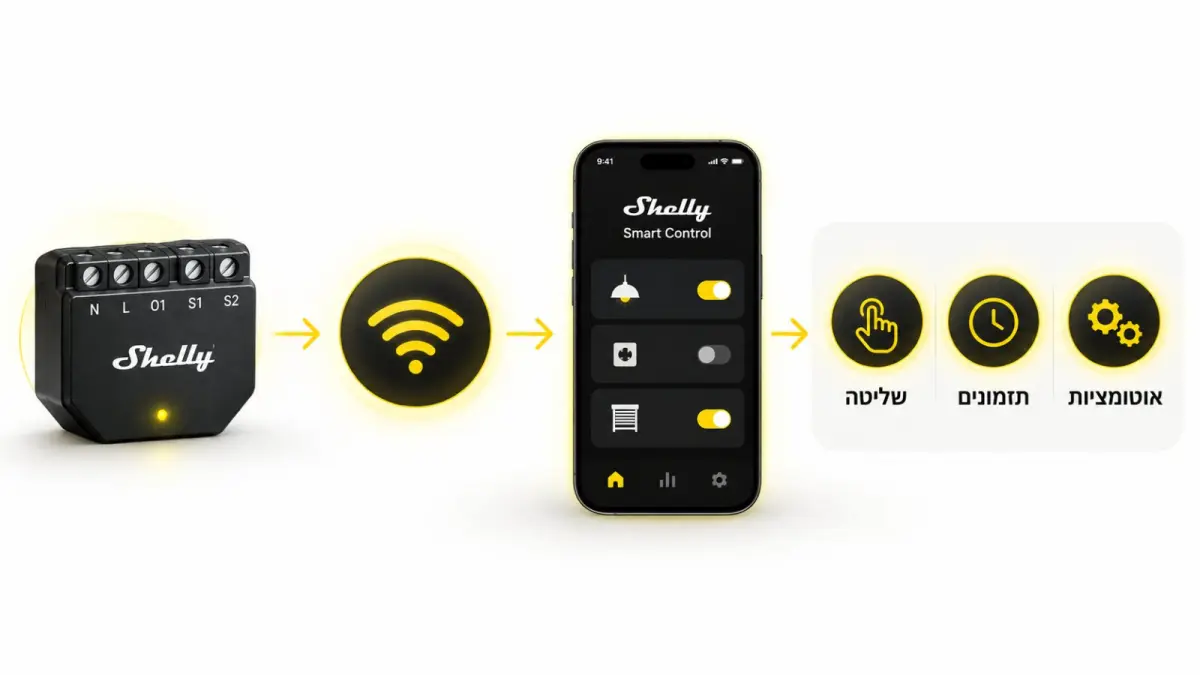
Much more than just switching things on and off from your phone.
You can control the lights, shutters and water heater, set on and off times, create scenes and automations, use sunrise and sunset times, set Shabbat timers, measure power consumption and get alerts from sensors, depending on what you've installed.
For example, you can come home to hot water, shut down several systems in one tap, have the shutters or lights run automatically at times you set, know how much electricity you're using and get an alert when something like a leak or an open door is detected.
In short: take the things you do by hand today and let your home do some of them for you.
Even on standard, existing wiring.
The advantage is that in many cases, all of this is possible on standard, existing electrical wiring.
Depending on the device and the installation, these compact devices can fit behind existing switches, in light fixtures, in shutter boxes, in junction boxes or in the electrical panel.
Your existing switches keep working as usual, with smart control added on top. Some local functions keep working without internet, depending on the device and its settings.
A tip from OZZI
If you're building a new home or renovating, ask your electrician to use deep wall boxes and run a neutral wire to every switch. It gives you more flexibility and makes it easier to add smart devices, now and later.
Where to start? Pick one and we'll build your list
Pick a starting point. The planner takes it from there and builds an exact parts list, with prices. 3 minutes, no sign-up.
Here's a simple breakdown.
Click a device name to go to its product page.
Roller shutters
Turn an existing electric roller shutter into a smart one, with control from your phone, schedules and automations, while you keep using your existing switch as usual.
One Shelly 2pm Gen4 per shutter.
Note: never connect two motors / shutters to a single unit.
Lighting
Add smart control from your phone, schedules, Shabbat timers and automations to your existing lights, without giving up the switches you already use. Even when there's no neutral wire behind the switch, there are devices that fit.
And so on.
Install Shelly 1L Gen3 / Shelly 2L Gen3 to match the number of switches.
Water heaters, radiators and other heavy loads
Smart control lets you switch loads like a water heater or radiator on and off remotely, set run times and include them in schedules and automations that fit your routine.
Air conditioners
Want to turn on the AC before you get home, or make sure it's off when you're out? You can add smart control to your AC, depending on the type of unit and how it's connected.
Ask your AC technician whether your unit has this option. If it does, Shelly 1 Gen4 is the one for you, and it's the preferred method.
Installing a Shelly 1Pm Gen4 behind the AC's outlet lets you turn it on and off.
Use a Shelly 1Pm Gen4 + a contactor
Adding a temperature sensor lets you set the room temperature you want in the app and schedule the AC around it.
Electric gates
Your gate is already electric, so you can add smart control to it too. Open it from your phone even when you're not nearby, and keep using your existing gate system.
For electric gates, including pedestrian gates, wire Shelly 1 Gen4 into the gate controller. That covers almost every case. Sometimes you'll need two.
Standard irrigation valves
Add smart control to your existing irrigation system so you can run it from your phone and set times and schedules, without relying on turning it on by hand.
For standard irrigation valves (solenoid valves): Shelly 1 Gen4 or Shelly 1 Mini
Do it yourself, but not alone
Even when you'd rather choose, buy and set up the system yourself, it's good to know there's an expert you can turn to if you need help along the way.
Information that helps you move forward
On the product pages and in the support section, you'll find wiring diagrams, guides and video tutorials to help with installation, setup and everyday use.
Expert support when you need it
Stuck on setup or not sure how to proceed? OZZI is still here for you after you buy.
A warranty you can rely on
OZZI offers a 2- to 5-year warranty, depending on the manufacturer's specifications.
OZZI, authorized SHELLY distributor in Israel.
FAQ
No. It helps to be comfortable with technology and willing to do a little reading and set up the devices, but the whole point of this page is to bring order and show you which device fits each need.
Not at all. You can start with one shutter, the water heater, the gate or a few lights, and expand later if you want.
Yes. In many cases the devices can be added to your existing wiring, and you keep using your existing switches. The right device depends on your wiring and what you want to control.
Some Shelly devices are designed for setups without a neutral wire. The lighting section on this page shows which ones.
No. Shelly devices connect directly to your Wi-Fi network, and most solutions don't need an extra hub.
You can handle the setup and the app on your own. Any work on mains-voltage wiring must be done by a licensed electrician.
You can use the product pages, wiring diagrams and video tutorials on our site, and contact OZZI for support if you need it.
Want to do it yourself, but not sure which device you need?
Tell us what you want to make smart and what you already have, and we'll help you figure out which solution and devices fit.
You don't need to know product names or come with a technical spec. Just tell us what you want to happen.